Pro
Edit the text in a PDF
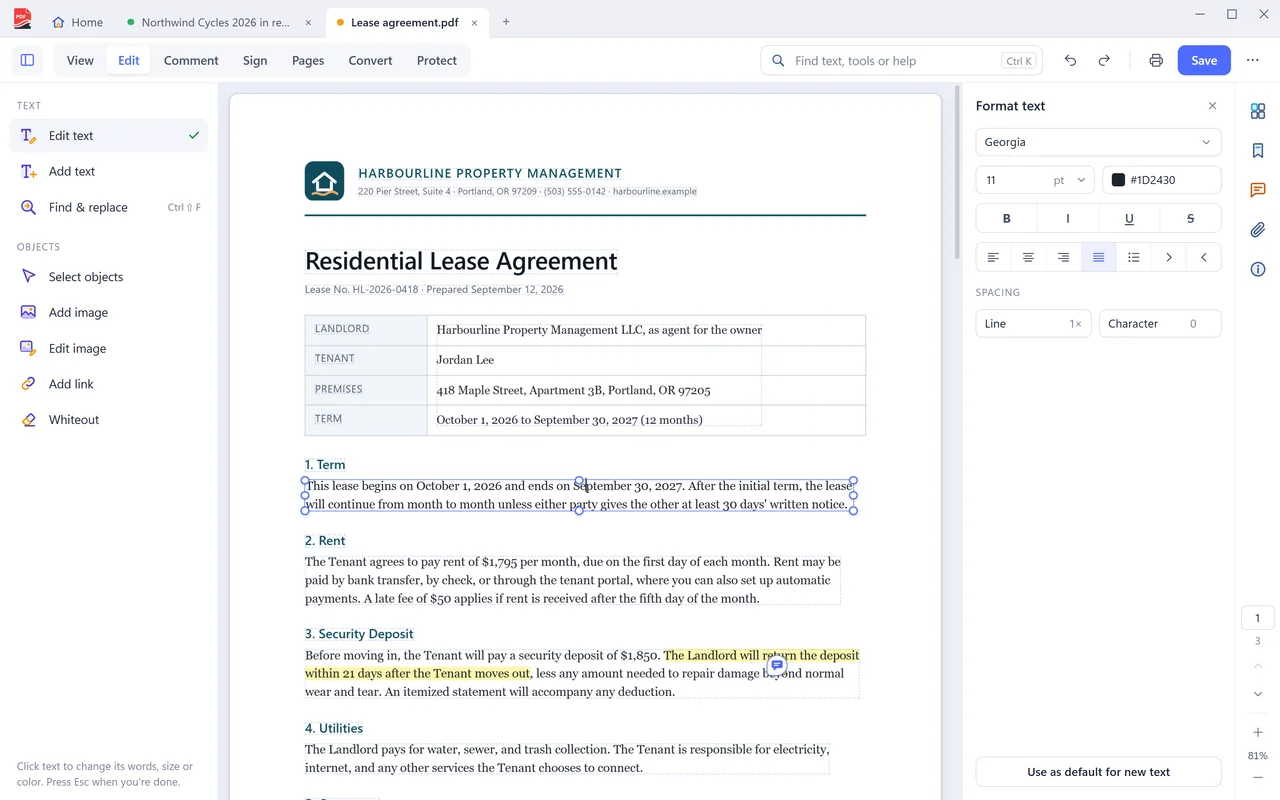
Click a paragraph and change the wording. The text reflows as you type, and the page keeps its layout.
Part of PDF Coast Pro. Try it free for 14 days, no payment method needed.
Updated 25 October 2026
The short answer
PDF Coast edits the text a PDF already contains, on your own PC. Open the file, choose Edit and then Edit text, click any paragraph and type. PDF Coast uses the document's own font, keeps the layout and reflows the paragraph around your change. Images can be replaced, moved and resized the same way. Editing is part of PDF Coast Pro, a one-time purchase, and you can try it free for 14 days.
- Price
- Pro, US$26.49 once. Free 14-day trial
- Your file
- Stays on your PC, never uploaded
- Internet
- Not needed
- Works on
- Windows 10 and 11
How to do it
- Open the PDF and choose Edit at the top of the window, then Edit text.
- Click the paragraph you want to change. The cursor goes into the page text itself.
- Type. The paragraph reflows as you go, and the font, size and color follow the text you clicked.
- Save. Pages and objects you did not touch are written back exactly as they were.
Edit PDF text online, or on your PC?
Online converters are handy on a phone. For anything private, a desktop app is safer.
 PDF Coast PDF Coast |
Typical online converter | |
|---|---|---|
| Your file is uploaded | Never | Yes, to their servers |
| Works without internet | Yes | No |
| Limits on free use | None on free tools | Daily or file-size limits are common |
| Account | Not needed | Often needed after a few files |
Questions
Does it edit the text, or cover it up?
It edits the text. PDF Coast rewrites the page content, so copy, search and screen readers all get the words you typed. Tools that draw a white box over the old text leave the original underneath, where anyone can recover it.
What if the font is not installed on my PC?
PDF Coast uses the font embedded in the document, so it does not need to be installed. If the embedded font is missing a character you type, PDF Coast tells you instead of quietly switching to a different typeface.
Is editing PDF text free?
Editing the existing text and images is part of PDF Coast Pro, a one-time purchase. You can try it free for 14 days with no account and no payment method. Adding your own text box on top of a page is free.
How much does PDF Coast Pro cost?
Pro is a one-time purchase of US$26.49, with no subscription and no renewals. Microsoft Store shows the price in your own currency before you confirm, and you can try every Pro tool free for 14 days first.
Is my file uploaded anywhere?
No. PDF Coast opens and saves the file on your own computer, and works with the internet switched off. Nothing about the document is sent anywhere.
Related tools
-
Free
Highlight and comment
Mark up a document and leave notes that other PDF apps can open.
-
Free
Fill and sign
Type into the fields, tick the boxes and sign. It works on scanned forms too.
-
Free
Merge PDF
Combine as many PDFs as you like, in the order you want. Free.
-
Pro
PDF to Word
An editable .docx with real paragraphs, tables, headers and footers. Converted on your PC.
Get PDF Coast for free
Everyday PDF work is free forever. Pro is US$26.49 once, and you can try every Pro tool free for 14 days. No account, no card, no subscription.
Windows 10 and 11, 64-bit. English, 简体中文 and 繁體中文.