Free Windows 10 and 11
A free PDF editor for Windows, with no watermark
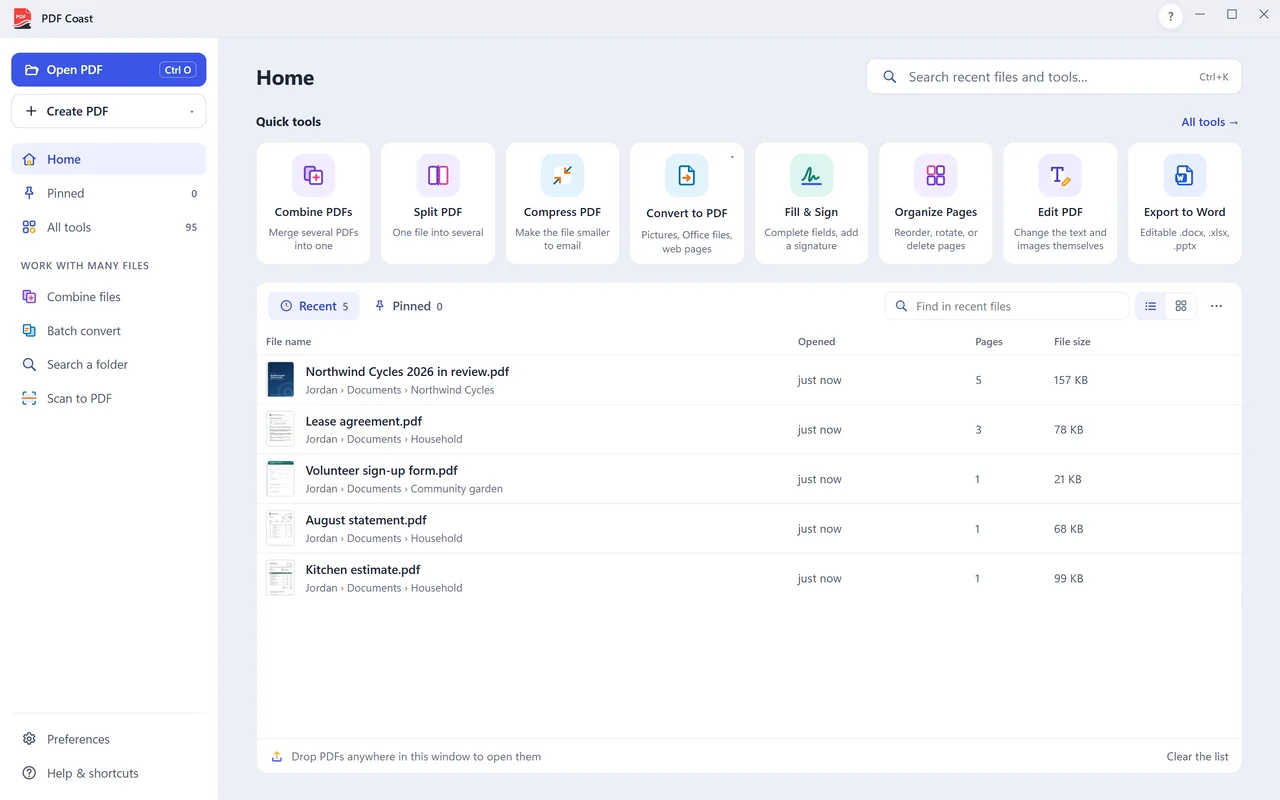
Merge, split, compress, fill in, sign and comment on PDFs for free on your own PC. No account, no daily limit, no ads, and nothing is uploaded.
- Free forever
- 14-day Pro trial, no card
- No account
- Installed by Microsoft Store
The short answer
PDF Coast is a free PDF editor for Windows 10 and 11, installed from Microsoft Store. The free version merges, splits, compresses, organizes, fills in, signs, comments on and creates PDFs, with no watermark, no account and no time limit, and it works offline. An optional one-time purchase, PDF Coast Pro (US$26.49), adds editing of the existing text, OCR, export to Word, Excel and PowerPoint, and redaction; every Pro tool can be tried free for 14 days.
What you can do for free
Every one of these is free for good, with no watermark on what you save.
-
Free
Highlight and comment
Mark up a document and leave notes that other PDF apps can open.
-
Free
Fill and sign
Type into the fields, tick the boxes and sign. It works on scanned forms too.
-
Free
PDF to JPG
One image per page, at the resolution you choose. Free.
-
Free
JPG to PDF
Photos, screenshots and phone scans become one tidy PDF. Free.
-
Free
Word to PDF
A .docx, .xlsx or .pptx becomes a PDF with its layout intact. Free.
-
Free
Scan to PDF
From the scanner to a finished PDF in one step. Free.
-
Free
Merge PDF
Combine as many PDFs as you like, in the order you want. Free.
-
Free
Split PDF
Break one document into several, or take out just the pages you need.
-
Free
Compress PDF
Shrink a file that is too big to email, without handing it to a website.
-
Free
Rotate PDF
Turn pages the right way up and save them that way. Free.
-
Free
Delete PDF pages
Remove the pages you do not need and keep the rest. Free.
-
Free
Add page numbers
Page numbers or Bates numbers, where you want them. Free.
-
Free
Add a watermark
Text or a picture, across every page or just a few. Free.
What Pro adds, if you ever need it
PDF Coast Pro is a single purchase of US$26.49. No subscription. Try every Pro tool free for 14 days first, with no account and no card.
- Edit PDF text: Click a paragraph and change the wording. The text reflows as you type, and the page keeps its layout.
- PDF to Word: An editable .docx with real paragraphs, tables, headers and footers. Converted on your PC.
- PDF to Excel: Real cells and real numbers, ready to sort, filter and total.
- PDF to PowerPoint: Each page becomes a slide, with text you can edit and pictures you can move.
- OCR a scanned PDF: Recognize the text in a scan without sending the scan anywhere.
- Redact PDF: Remove private details for good. The text is deleted from the file, not hidden under a box.
- Password protect: AES-256 encryption, set on your own computer.
System requirements
| Windows | Windows 11, or Windows 10 version 1809 or later |
|---|---|
| Processor | 64-bit (x64) |
| Download | About 170 MB from Microsoft Store |
| Internet | Only to install and update. Everything else works offline. |
| App languages | English, Simplified Chinese, Traditional Chinese |
Questions
Is it really free, with no watermark?
Yes. The free tools never add a watermark, never ask for an account and have no daily limit or end date. Only the professional tools (editing the existing text, OCR, export to Office, redaction and batch work) are part of Pro.
Does it work on Windows 11?
Yes. PDF Coast runs on Windows 11 and on Windows 10 version 1809 or later, on 64-bit PCs.
Does it work on Windows 7 or 8?
No. PDF Coast needs Windows 10 or 11, because it is installed and updated through Microsoft Store.
Can I use it without the internet?
Yes. After installing, every tool works offline, including OCR, because nothing is processed online.
Can I make it my default PDF app?
Yes. In Windows Settings, open Apps, then Default apps, find PDF Coast and set it for .pdf. The download page shows the steps.
Is PDF Coast safe to install?
Yes. PDF Coast is published only through Microsoft Store, which certifies every version before release, installs it, updates it and lets you remove it from Windows Settings. The download button gives you Microsoft's own small installer, which installs nothing but PDF Coast. There is no bundled software and there are no ads.
Get PDF Coast for free
Everyday PDF work is free forever. Pro is US$26.49 once, and you can try every Pro tool free for 14 days. No account, no card, no subscription.
Windows 10 and 11, 64-bit. English, 简体中文 and 繁體中文.